




How to Start a Blog: A Step-by-Step Guide for Beginners Starting a blog can be a practical way to share your knowledge, build an online presence, develop a business, or create an additional source of income. You do not need to be a professional writer or web developer to begin. With a clear topic, the
How to Start a Blog: A Step-by-Step Guide for Beginners
Starting a blog can be a practical way to share your knowledge, build an online presence, develop a business, or create an additional source of income. You do not need to be a professional writer or web developer to begin. With a clear topic, the right blogging platform, and a little patience, you can build a blog from scratch.
However, starting a blog involves more than choosing a name and publishing a few articles. You need to decide what your blog will cover, choose a platform, select a domain name, understand the costs, create useful content, and learn how to attract readers.
The good news is that there are several ways to get started. You can use WordPress.org for greater control, WordPress.com for a managed WordPress experience, or Blogger for a straightforward hosted blogging service.
This guide explains how to start a blog step by step, compares these three platforms, and includes practical advice for beginners in Nigeria and other countries.
By the end, you should understand what you need, which platform may suit your goals, and how to publish your first blog post.
1. What Is a Blog?
A blog is a website or section of a website where an individual, business, or organisation regularly publishes articles called blog posts.
Blog posts usually appear in reverse chronological order, with newer posts displayed before older ones. They may cover subjects such as technology, business, education, travel, lifestyle, personal experiences, food, finance, or digital marketing.
For example:
- A food blogger might publish recipes, cooking tutorials, and restaurant reviews.
- A technology blogger might explain software, review gadgets, and discuss industry developments.
- A business blogger might share marketing advice, business lessons, and industry research.
- A freelance professional might publish tutorials and case studies to demonstrate their expertise.
A blog can operate as a standalone website or as part of a larger business website.
Unlike social media posts, which are usually published within another company’s platform, a blog gives you a dedicated place to organise your content and develop a long-term online presence.
2. Is Starting a Blog Still Worthwhile?
Yes, starting a blog can still be worthwhile, provided you have a clear purpose and are prepared to create useful content consistently.
People use blogs for different reasons. Some want to teach others, some want to promote a business, and others want to build an audience around a subject they enjoy.
Here are some potential benefits.
Build an online presence
A blog gives you a central place to publish your ideas, knowledge, work, and achievements. You can share its articles through social media, email newsletters, professional networks, and other channels.
Demonstrate your expertise
If you understand a subject, publishing helpful explanations and practical guides can help demonstrate what you know.
For example, a freelance graphic designer could publish articles about logo design, branding, and visual communication. A digital marketer could share campaign breakdowns and practical SEO tutorials.
Promote a business or service
A business blog can answer customers’ questions, explain products, demonstrate how services work, and attract people who are researching a problem your business solves.
A Nigerian small business, for instance, might publish guides about choosing reliable suppliers, managing online orders, or promoting products to local customers.
Create opportunities to earn money
Some blogs eventually generate income through advertising, affiliate marketing, sponsored content, digital products, or services.
However, blogging is not a guaranteed or immediate source of income. It takes time to build an audience, establish trust, and develop content that people find valuable.
The best reason to start a blog is to create something useful for a clearly defined audience. Income opportunities can develop as the blog grows, but they should not be treated as guaranteed results.
3. Choose a Blog Niche
Your blog niche is the main subject or area your blog focuses on.
Choosing a niche helps you decide what to publish, who your intended readers are, and what problems your content should address.
For example, instead of starting a blog about everything, you might focus on:
- Personal finance for young adults.
- Digital marketing for small businesses.
- Technology tutorials for beginners.
- Freelancing and remote work.
- Food and cooking.
- Travel within Nigeria and Africa.
- Personal development and career growth.
- Blogging and content creation.
You do not have to choose an extremely narrow topic, but your blog should have a recognisable focus.
How to choose a suitable niche
Consider these four questions before making your decision.
1. What are you interested in?
Choose a subject you can imagine researching and writing about regularly. You do not need to be an expert at the beginning, but you should be willing to learn and improve.
2. What do you know or have experience with?
Think about your education, work experience, hobbies, skills, and personal experiences. These can provide useful starting points for original articles.
3. What problems can you help people solve?
A useful blog gives readers something they can learn, understand, or apply.
For example, instead of publishing general articles about technology, you could explain how beginners can use specific tools to complete everyday tasks.
4. Is there an audience for the subject?
Look at search results, online communities, social media discussions, and existing blogs. Pay attention to the questions people ask and the problems they repeatedly discuss.
You can also use Google Trends to explore how interest in a topic changes over time.
A simple niche-selection exercise
Write down three subjects you could comfortably research and discuss.
For each subject, list:
- Five questions beginners might ask.
- Five problems people commonly experience.
- Five article ideas you could develop.
- A few websites or communities where people discuss the subject.
If you struggle to identify useful article ideas, the niche may need to be narrowed or reconsidered.
Tip: You can expand your blog later. It is usually easier to build a recognisable identity around a clear subject than to publish unrelated articles without a consistent direction.
4. Choose a Blogging Platform
A blogging platform is the software or service you use to create, manage, and publish your blog.
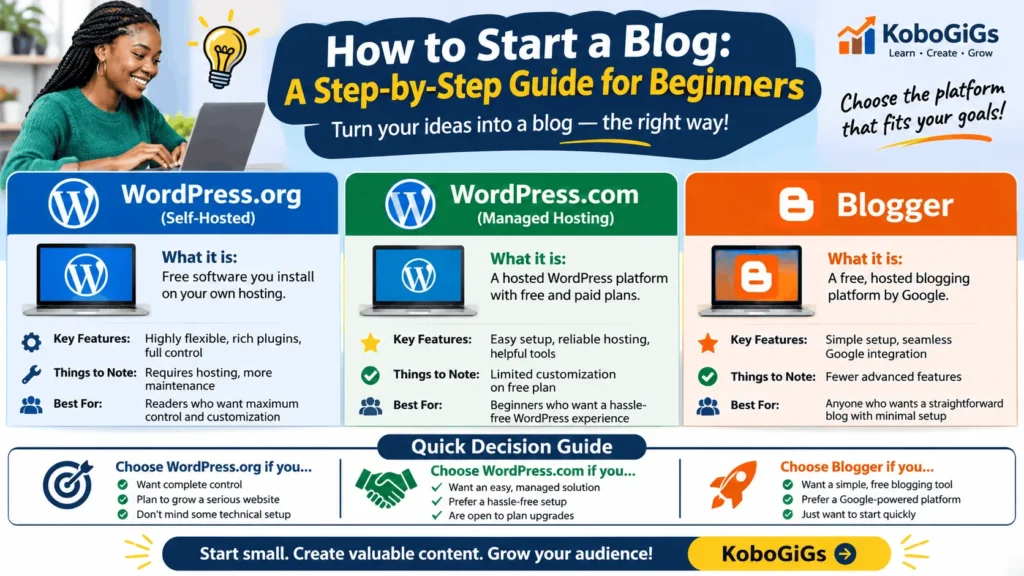
There are many options, but three popular choices for beginners are WordPress.org, WordPress.com, and Blogger.
Although WordPress.org and WordPress.com share the WordPress name, they are different services.
WordPress.org: Best for flexibility and control
WordPress.org provides free, open-source website software that you install on a web hosting account.
You generally arrange your own hosting and domain name, install WordPress, and manage your website through its dashboard.
Advantages:
- Extensive control over your website.
- A large selection of themes and plugins.
- Flexibility to build a blog, business website, portfolio, or more complex platform.
- Greater control over hosting and website configuration.
- Room to expand as your website develops.
Things to consider:
- You must arrange hosting.
- You are responsible for important maintenance tasks or must ensure your hosting provider handles them.
- You need to manage backups, updates, security, and other technical details.
- Some themes, plugins, and services cost money.
WordPress.org is a good option for people who want to build a website they can customise extensively and are comfortable taking responsibility for its management.
WordPress.com: Best for a managed WordPress experience
WordPress.com is a hosted website platform built around WordPress.
Instead of arranging a separate hosting account and installing the software yourself, you create an account and build your website through the service.
It offers a free address ending in .wordpress.com, as well as paid plans with different features.
Advantages:
- Hosting is included.
- You can start without arranging a separate hosting account.
- Website setup is guided.
- You can choose a design and customise your website.
- Different plans are available for different needs.
Things to consider:
- Features depend on the plan you choose.
- Some customisation and advanced capabilities require a paid plan.
- You should check plan restrictions before choosing a subscription.
- You have less control over the underlying hosting environment than with a self-hosted installation.
WordPress.com can suit beginners who want a managed experience and prefer not to handle hosting setup themselves.
Blogger: Best for simple, straightforward blogging
Blogger is Google’s hosted blogging platform.
You can create a blog, choose an available Blogspot address, select a design, and publish articles without arranging separate web hosting.
Advantages:
- Simple account and blog creation process.
- Hosted by Google.
- Free Blogspot address available.
- Straightforward post publishing.
- Option to connect a custom domain.
Things to consider:
- Fewer advanced customisation options than a typical self-hosted WordPress website.
- Less flexibility for building a complex website.
- Design and functionality options are more limited.
- You depend on Google’s Blogger service and its policies.
Blogger can be a sensible starting point if you want a straightforward place to publish articles without managing a separate hosting account.
WordPress.org vs WordPress.com vs Blogger
| Feature | WordPress.org | WordPress.com | Blogger |
|---|---|---|---|
| Hosting | Arrange separately | Included | Included |
| Starting option | Free software; hosting costs extra | Free and paid plans | Free hosted blogging |
| Custom domain | Yes, arrange separately | Depends on plan and domain arrangement | Yes, purchase separately |
| Customisation | Extensive | Depends on plan | More limited |
| Plugins | Broad plugin ecosystem | Depends on plan | No equivalent WordPress plugin system |
| Maintenance | More user responsibility | Mostly managed by service | Mostly managed by service |
| Best suited to | People wanting control and flexibility | People wanting managed WordPress | People wanting simple blogging |
Which platform should you choose?
There is no universally best blogging platform. The right choice depends on your goals, budget, technical confidence, and plans for the website.
Choose WordPress.org if you want extensive control, plan to develop a more flexible website, and are willing to manage hosting and maintenance.
Choose WordPress.com if you want a hosted WordPress experience and prefer guided setup, with the option to upgrade when you need additional features.
Choose Blogger if you want a straightforward hosted blogging tool and do not need extensive website customisation.
Before committing to a paid plan, check the provider’s current features, renewal conditions, storage limits, domain arrangements, and upgrade requirements.
5. Choose a Blog Name and Domain Name
Your blog name is the name readers will associate with your website. Your domain name is the web address people enter into their browsers to visit it.
For example, in example.com, the domain name is example.com.
A good blog name should be:
- Easy to remember.
- Easy to spell and pronounce.
- Relevant to your blog’s subject or identity.
- Distinctive enough to avoid confusion with another brand.
- Flexible enough to accommodate future growth.
Tips for choosing a blog name
Start by writing down words associated with your niche, audience, or intended brand.
Try combining relevant words, using a short phrase, or choosing a distinctive brand name.
Avoid names that are unnecessarily long, confusing, or difficult to spell.
Before settling on a name, check whether the matching domain is available and whether another business is already using the name in a way that could create a trademark or brand conflict.
Choosing a domain extension
A domain extension is the ending of a web address.
Common examples include:
.com– widely used internationally..org– commonly associated with organisations, though it is not restricted to them..ng– Nigeria’s country-code domain..com.ng– commonly used by commercial websites in Nigeria.
For a Nigerian blog targeting both local and international readers, either a suitable .com or Nigerian domain extension may work.
The important thing is to choose an address that fits your identity and audience.
Should you use a free domain?
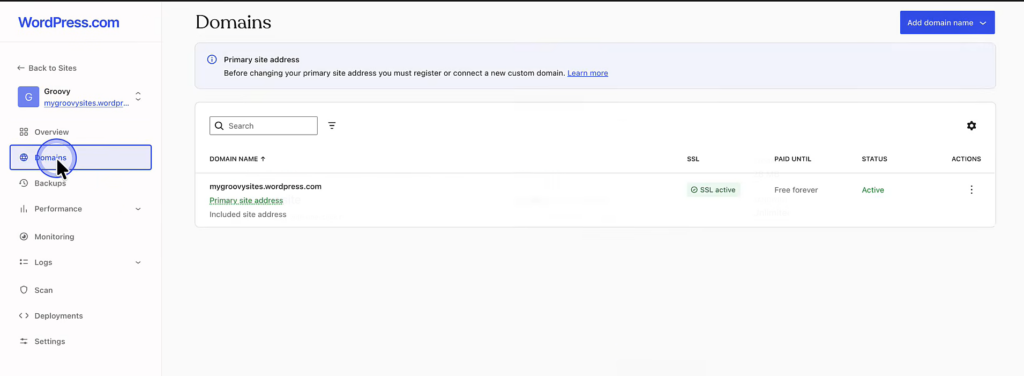
Some blogging platforms provide a free subdomain.
Examples include:
yourblog.blogspot.comyourblog.wordpress.com
This can be useful when testing an idea or learning how blogging works.
However, a custom domain such as yourblog.com gives your blog a more independent identity. It can also make your website address easier to communicate.
If you plan to build a long-term brand, consider using a custom domain when your budget allows.
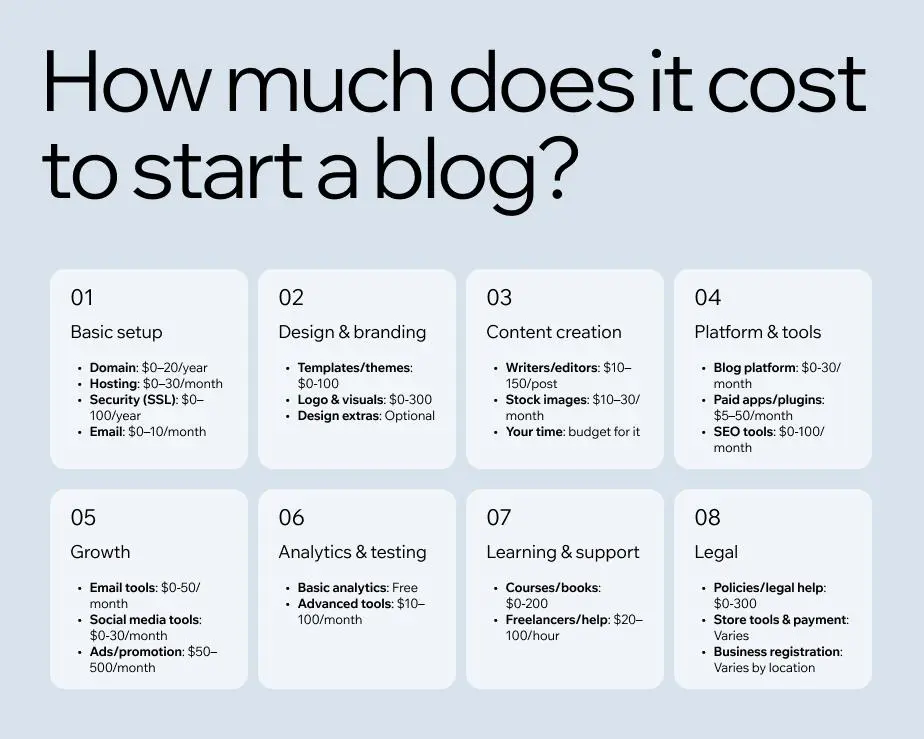
6. Understand the Cost of Starting a Blog
One of the most common questions beginners ask is: How much money do I need to start a blog?
The answer depends on your platform, hosting arrangement, domain name, design requirements, and optional tools.
You can begin with a free hosted blogging service, or you can invest in a custom domain and paid hosting.
Common blogging expenses
1. Domain registration
A domain is the address of your website. You normally pay to register it for a specific period and renew it when that period expires.
The cost depends on the domain extension and registrar.
2. Web hosting
Hosting is the service that stores your website’s files and makes them available online.
If you choose self-hosted WordPress, you need a hosting provider.
With WordPress.com and Blogger, hosting is included in the service, although paid plans or optional upgrades may still apply.
3. Website theme or design
Many platforms provide free themes or templates.
You can use one of these to begin. A premium theme is optional, not a requirement for publishing a useful blog.
4. Plugins and additional tools
Some WordPress plugins and external services are free, while others require payment.
Do not buy several tools simply because they are advertised as essential. Start with what your website genuinely needs.
5. Content and images
You can write articles yourself and use original photographs, diagrams, and screenshots.
If you hire writers, designers, photographers, or editors, include those expenses in your budget.
Illustrative cost worksheet for Nigerian beginners
The following table is intentionally left for current provider verification. Prices can change, and introductory offers may differ substantially from renewal prices.
| Expense | WordPress.org | WordPress.com | Blogger |
|---|---|---|---|
| Platform software | Free | Free entry option available | Free |
| Hosting | Paid hosting required | Included | Included |
| Domain | Optional, but recommended | Custom domain subject to plan and arrangement | Optional custom domain |
| Theme | Free and paid options | Plan/design dependent | Available templates |
| Extra tools | Optional | Plan dependent | Optional external services |
- Domain registration:
$13 - Domain renewal:
$14 - Shared WordPress hosting: Starting From
$4 - $42 / Month - Hosting renewal:
$5 - $50$ / Month - WordPress.com plan: Personal, Premium, Business, Commerce and Enterprise
Important: Current price might vary from time of publishing. Do not assume the cheapest introductory price represents the long-term cost of running a blog.
Can you start a blog for free?
Yes. Blogger offers free hosted blogging, and WordPress.com has a free starting option.
These can help you learn how to write, publish, and manage a blog without immediately paying for hosting.
However, free plans may have limitations involving website addresses, customisation, storage, monetisation, or advanced features.
If your blog is intended to become a long-term business asset, compare the free option with the cost of using a custom domain and any features you may eventually need.
7. How to Start a Blog Using WordPress.org
If you want greater control over your website, WordPress.org is a strong option to consider.
The process involves getting a domain and hosting account, installing WordPress, choosing a design, and creating your first content.
Step 1: Register a domain name
Choose a domain name that reflects your blog’s identity.
Register it through a reputable domain registrar or a hosting company that provides domain registration.
Before paying, check the registration period, renewal cost, ownership details, and any additional charges.
Step 2: Purchase web hosting
Choose a hosting provider that supports WordPress.
The official WordPress requirements recommend a host that supports PHP 8.3 or greater, MariaDB 10.11 or greater or MySQL 8.0 or greater, and HTTPS.
You can review the current requirements on the WordPress.org requirements page.
For a new beginner’s blog, a suitable shared hosting plan may be sufficient. You do not necessarily need an expensive hosting package at the beginning.
Compare:
- Storage and resource limits.
- SSL/HTTPS availability.
- Backup arrangements.
- Customer support.
- Renewal pricing.
- Server performance.
- WordPress installation options.
- Migration and cancellation policies.
Step 3: Connect your domain to your hosting account
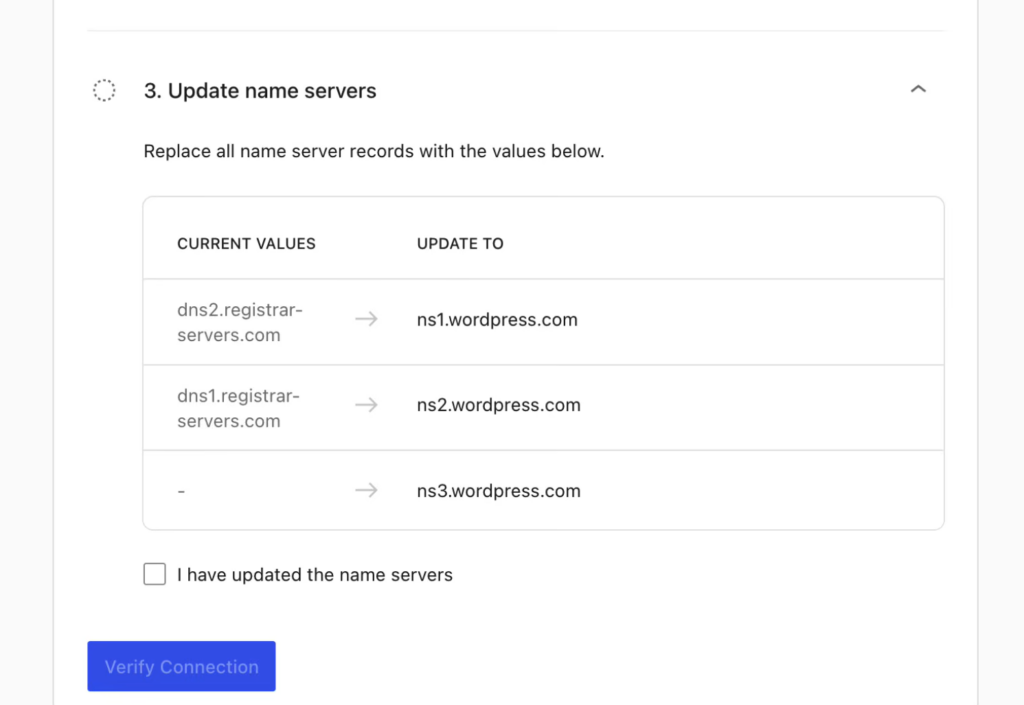
If your domain and hosting are purchased from different providers, you may need to update your domain’s nameservers or DNS records.
Your hosting provider should provide the correct instructions.
DNS changes can take time to become visible across the internet. Follow the provider’s guidance rather than changing records randomly.
Step 4: Install WordPress
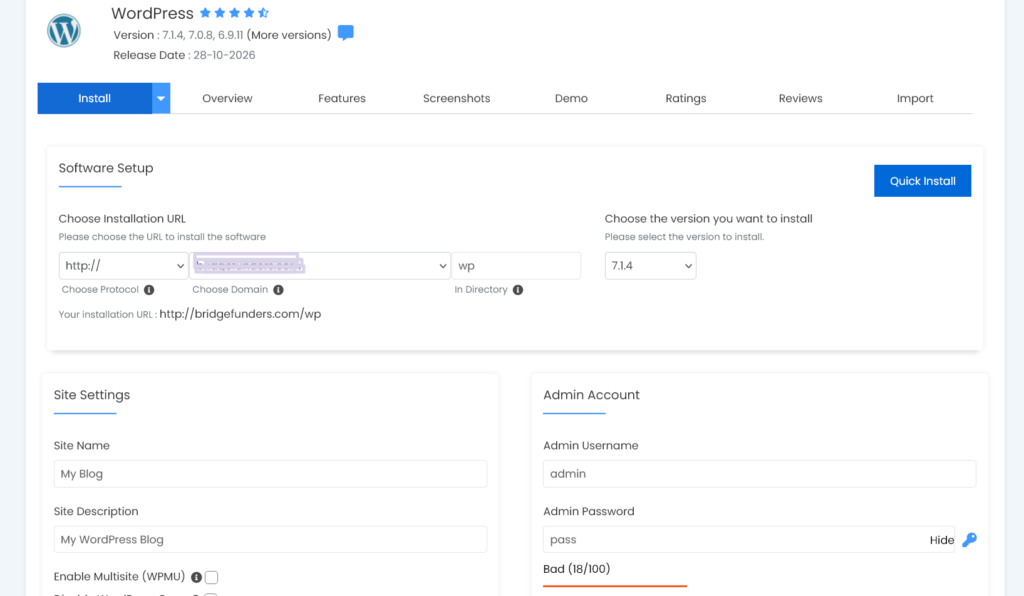
Many hosting providers offer an automatic WordPress installation tool in their control panels.
The exact menu names vary, but the general process is:
- Sign in to your hosting account.
- Open the website or application installation section.
- Select WordPress.
- Choose the domain where you want to install it.
- Enter your website title and administrator details.
- Complete the installation.
- Save your login information securely.
Some hosts also offer WordPress installation during the initial hosting setup.
If your provider does not offer an automatic installer, you can follow the official WordPress installation documentation.
Step 5: Log in to your WordPress dashboard
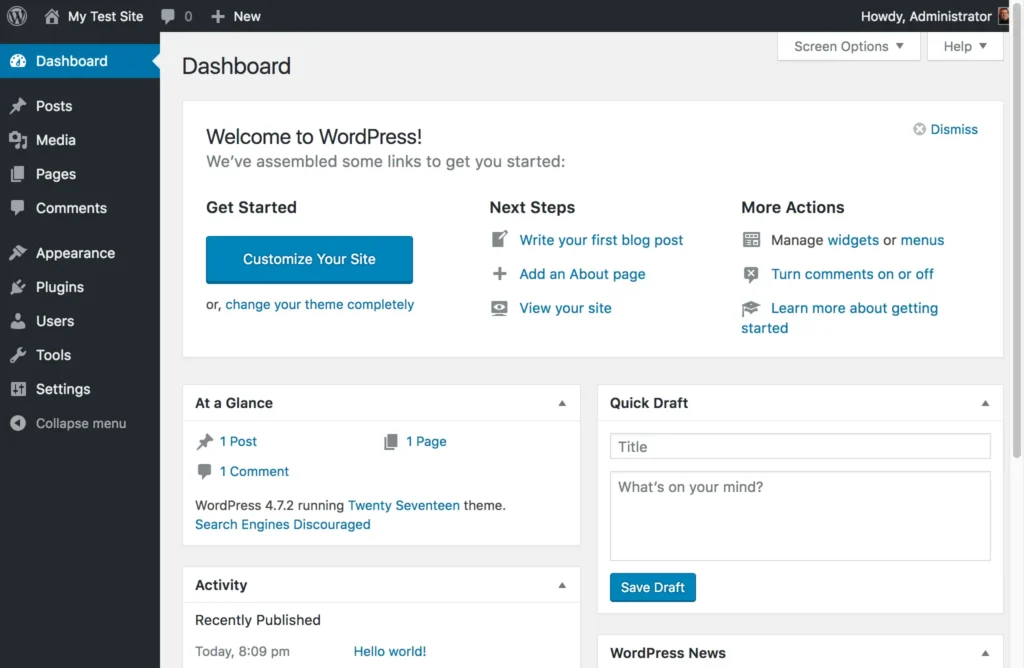
After installation, visit your WordPress administration address.
It commonly looks like:
https://yourdomain.com/wp-admin
Enter the administrator username and password you created during installation.
You should now see the WordPress dashboard, where you can manage posts, pages, themes, plugins, users, and settings.
Step 6: Choose a theme
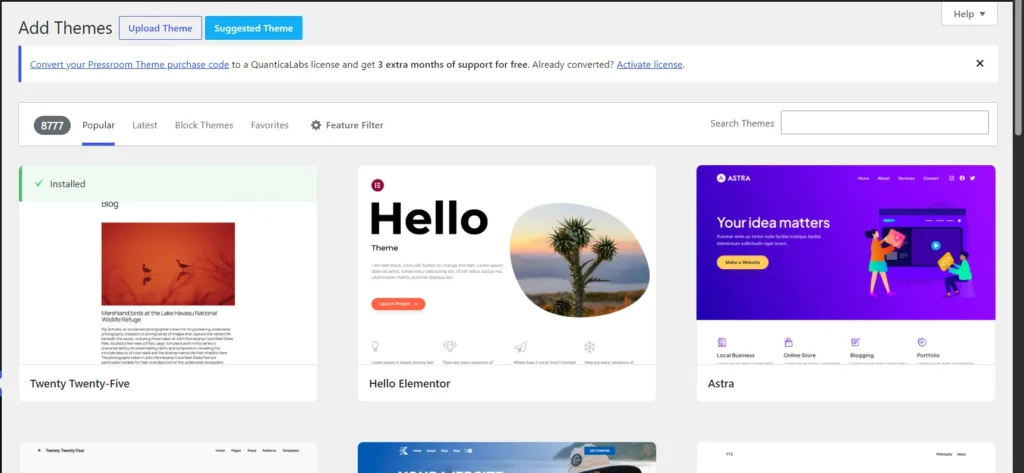
A WordPress theme controls the visual design and layout of your website.
To choose one:
- Open your WordPress dashboard.
- Go to Appearance.
- Select Themes.
- Browse available themes.
- Preview a theme before activating it.
- Activate the design you prefer.
Choose a theme that is:
- Easy to navigate.
- Mobile-friendly.
- Readable.
- Regularly maintained.
- Suitable for the type of website you want to build.
You do not need an expensive design to start blogging. A simple, well-organised theme is often enough.
Step 7: Install only the plugins you need
Plugins add functionality to WordPress websites.
Depending on your needs, you may eventually use plugins for:
- Search engine optimisation.
- Website backups.
- Security.
- Contact forms.
- Performance optimisation.
- Spam protection.
However, installing too many unnecessary plugins can make your website harder to maintain.
Choose reputable plugins, check when they were last updated, review their compatibility, and remove ones you no longer use.
Step 8: Create essential pages
Before publishing regularly, create a few important pages.
About: Explain who runs the blog, what it covers, and who it is intended to help.
Contact: Give visitors a way to reach you. This might be a contact form or a professional email address.
Privacy Policy: Explain how your website handles personal information and any relevant cookies or third-party services. Your policy should reflect what your website actually does.
Depending on your website, you may also need terms and conditions, disclosures, or other policy pages.
Do not copy a policy blindly. Review it and make sure it accurately describes your website.
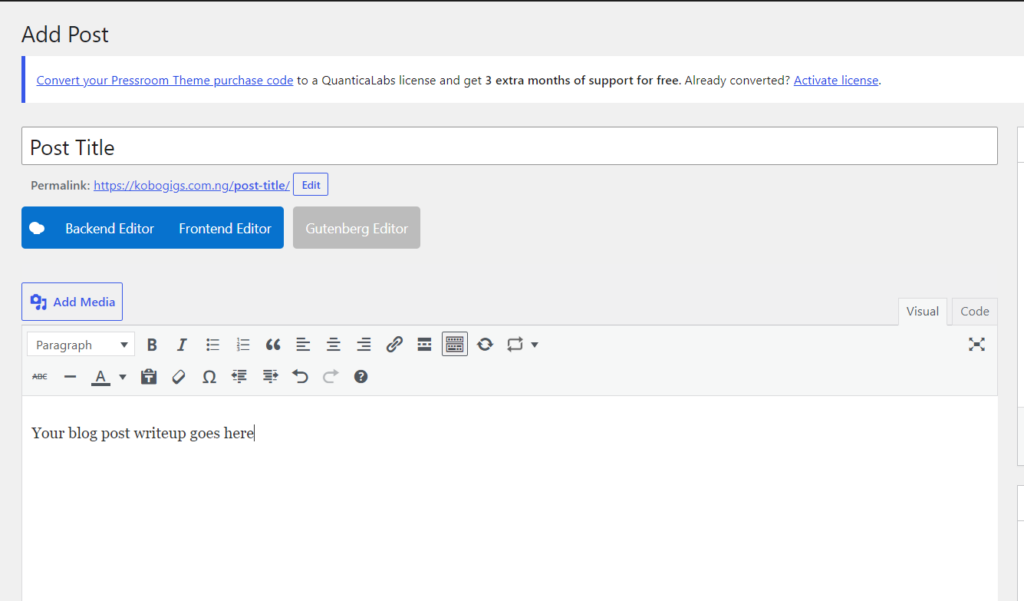
Step 9: Publish your first post
Once your website is ready, open:
Posts → Add New.
Enter your article title, write your content in the editor, add relevant images, and organise the article with headings.
You can save a draft, preview the article, and publish it when you are satisfied.
8. How to Start a Blog Using WordPress.com
WordPress.com is a convenient alternative if you want WordPress without arranging separate web hosting.
The setup process is guided, although the available features depend on the plan you choose.
Step 1: Visit WordPress.com
Go to WordPress.com and select the option to get started.
Create an account using the available registration options.
Step 2: Choose your website address
You can begin with a free WordPress.com address or register, connect, or transfer a custom domain where available.
Choose an address that is easy to remember and relevant to your blog.
Step 3: Choose a plan
Review the available plans before selecting one.
WordPress.com offers a free starting option and paid plans with different features.
Check whether the plan includes the domain arrangement, storage, customisation, plugin access, and other functionality you need.
Do not upgrade simply because you think every new blog needs a premium subscription. Choose based on your actual requirements.
Step 4: Select a design
Choose a theme or design that fits your blog.
You can customise elements such as:
- Site title.
- Tagline.
- Colours.
- Fonts.
- Homepage layout.
- Navigation.
- Header and footer.
Start with a clean design that makes your content easy to read.
Step 5: Create your main pages
Add your About, Contact, and Privacy Policy pages.
You can also create other pages relevant to your website, such as Services, Resources, or Advertise With Us.
Make sure your navigation menu helps visitors find the most important sections.
Step 6: Publish your first article
Open the Posts section of your dashboard and create a new post.
Add your title, article text, headings, images, and other relevant elements.
Preview the article before publishing it.
Step 7: Launch your website
New WordPress.com sites may display a Coming Soon page while you work on them.
When your website is ready, review the content and navigation, confirm your contact details, and check your domain.
The current launch instructions are available in the WordPress.com launch guide.
After launching, visit your website in a private browser window and on a mobile device to confirm that visitors can see the public version.
9. How to Start a Blog Using Blogger
Blogger is a straightforward option if you want to begin publishing articles without setting up separate web hosting.
You need a Google account to get started.
Step 1: Visit Blogger
Go to Blogger and sign in with your Google account.
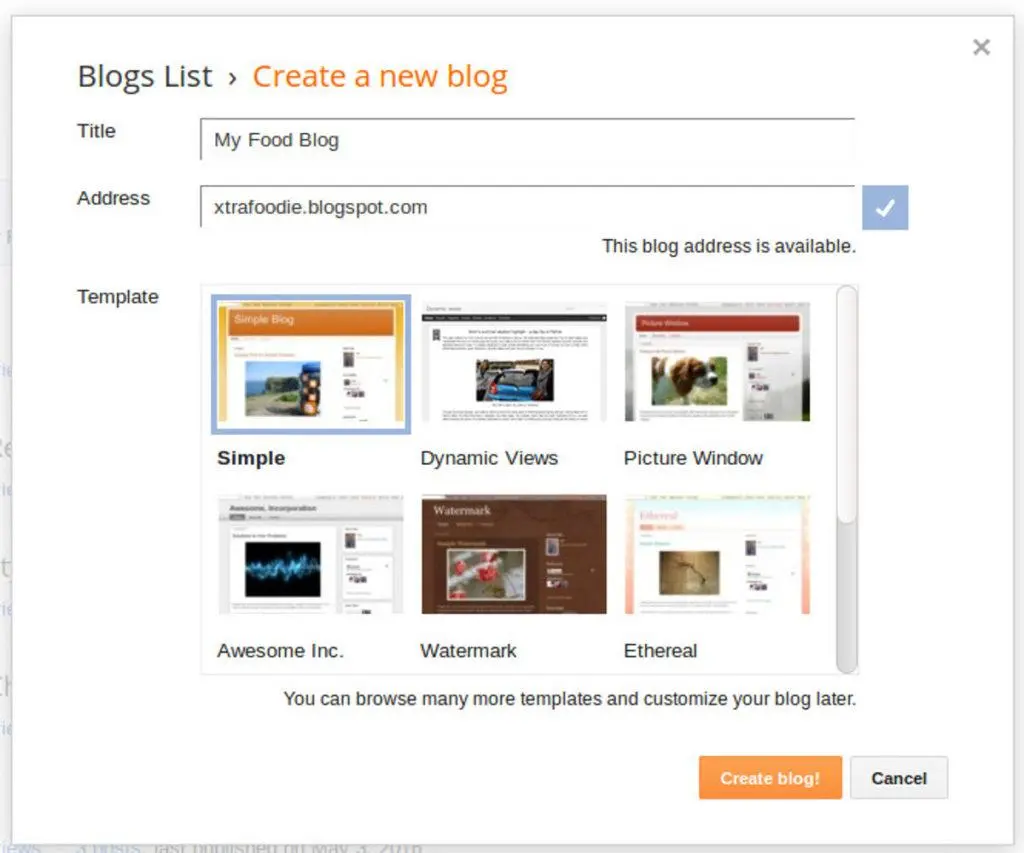
Step 2: Create a new blog
After signing in:
- Click the dropdown arrow on the left.
- Select New blog.
- Enter your blog name.
- Click Next.
- Choose an available blog address.
- Click Save.
Your blog will now have a Blogspot address.
These steps follow Google’s official Blogger creation guide.
Step 3: Choose a theme
Open the Theme section of your Blogger dashboard.
Browse the available designs and select one that suits your content.
Preview the design where possible, and make sure your text is readable on both desktop and mobile screens.
Step 4: Configure your blog settings
Review your blog’s basic settings.
These may include:
- Blog title and description.
- Language.
- Time zone.
- Comment settings.
- Search engine visibility.
- HTTPS settings.
- Custom domain settings.
Pay particular attention to the option that allows search engines to find your blog.
You can review the available options in Google’s Blogger settings guide.
Step 5: Create your first post
From the Blogger dashboard:
- Click New Post.
- Enter your article title.
- Write your content in the editor.
- Add relevant images.
- Preview the post.
- Save it or publish it when ready.
Take time to review the formatting before making the article public.
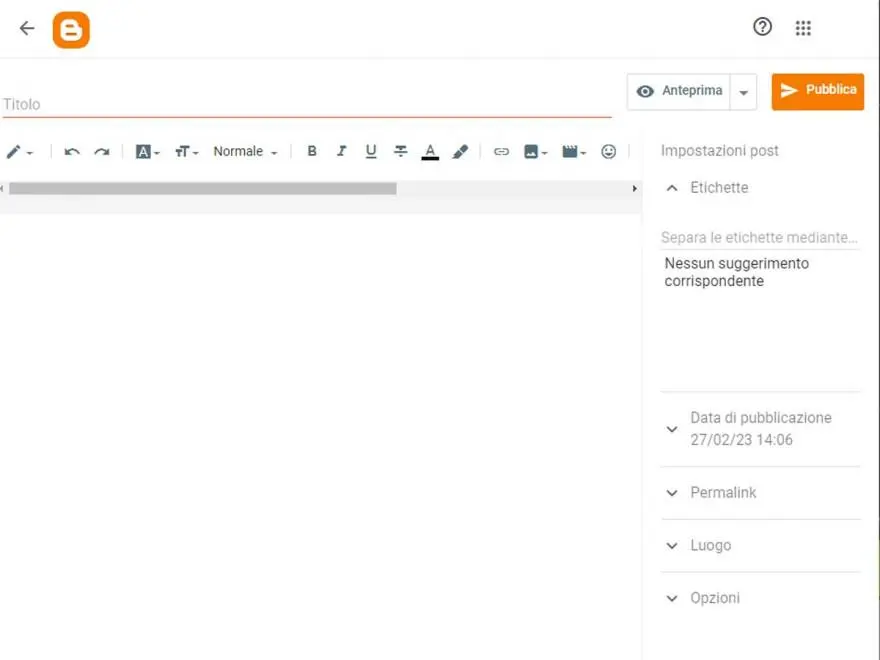
Blogger Editor
Step 6: Connect a custom domain if you want one
You can continue using your free Blogspot address or connect a domain you have registered separately.
To connect a custom domain:
- Open Blogger Settings.
- Find the Publishing section.
- Select Custom domain.
- Enter the domain you purchased.
- Follow the DNS instructions Blogger provides.
- Add the required records through your domain provider.
- Return to Blogger and complete the setup.
Blogger may provide CNAME records that you need to add to your domain’s DNS settings. Some changes take time to become active.
Read the official Blogger custom-domain instructions before making changes.
10. Set Up Your Blog Properly Before Publishing Regularly
After creating your blog, spend some time organising it.
A website can be technically online but still be difficult for visitors to use. A clear structure helps people find information and understand what your blog offers.
Create a useful homepage
Your homepage should communicate what your website is about.
Depending on your design, it may include:
- Your blog name and description.
- A short introduction.
- Links to important categories.
- Recent or featured articles.
- An About section.
- A contact link.
Avoid filling the homepage with unnecessary animations, pop-ups, or decorative elements that distract from the content.
Organise your articles into categories
Categories group related articles together.
For example, a blog about digital skills might have categories such as:
- Blogging.
- Digital Marketing.
- Freelancing.
- Website Development.
- Online Business.
Choose categories that reflect your actual content. You do not need dozens of categories when you are just starting.
Make your blog mobile-friendly
Many people access websites using smartphones.
Check that:
- Text is readable without zooming.
- Images fit the screen.
- Menus are easy to use.
- Buttons and links are easy to tap.
- Articles do not require excessive horizontal scrolling.
A clean mobile experience is especially important if you expect readers from mobile-first markets, including Nigeria.
Use HTTPS
HTTPS helps protect the connection between your website and its visitors.
For self-hosted WordPress, confirm that your hosting provider supports HTTPS and that your site is configured to use it.
Blogger automatically provides HTTPS for Blogspot addresses. For custom domains, review its HTTPS settings.
For WordPress.com, check that your domain and website are using the secure version of the address.
Set up backups and security
If you use self-hosted WordPress, understand how your hosting provider handles backups.
Know how to restore your website if something goes wrong.
Keep WordPress, themes, and plugins updated, use strong unique passwords, and avoid giving administrator access to people who do not need it.
For hosted platforms, review the account security options and protect the Google or WordPress.com account associated with your blog.
11. Write and Publish Your First Blog Post
Your first article does not have to be perfect, but it should be useful, clear, and relevant to your intended readers.
Before writing, decide what question the article will answer.
For example, if your blog focuses on freelancing, you might write:
- How to Create a Freelance Portfolio.
- How to Find Your First Freelance Client.
- How to Write a Professional Freelance Proposal.
If your blog focuses on food, your first article might be a practical recipe or a guide to preparing a particular meal.
Choose a clear article topic
Avoid choosing a topic simply because it sounds popular.
Think about what your audience wants to understand or accomplish.
A good starting point is to list questions you hear from people, problems you have personally encountered, or subjects you have researched thoroughly.
Create an outline
An outline gives your article structure before you begin writing.
A simple beginner-friendly outline could look like this:
Title: How to Create a Professional Freelance Portfolio
Introduction: Explain why a portfolio matters.
Section 1: What is a freelance portfolio?
Section 2: What should a portfolio include?
Section 3: How to create a portfolio without paid experience.
Section 4: Where to publish your portfolio.
Section 5: Common mistakes to avoid.
Conclusion: Summarise the key steps.
FAQs: Answer common follow-up questions.
Write a helpful introduction
The introduction should tell readers what the article covers and why it matters.
Avoid long introductions that delay the useful information.
Get to the main subject quickly.
Use headings and short paragraphs
Break your article into logical sections.
Use headings to help readers understand what each section covers. Keep paragraphs manageable and use lists where they make information easier to follow.
Add original images where useful
Images can make tutorials easier to understand.
You could include:
- Screenshots of actual setup steps.
- Original photographs.
- Diagrams.
- Comparison tables.
- Simple illustrations.
For a tutorial, a screenshot showing the exact menu or setting can be more useful than a decorative stock image.
Only use images you own or have permission to publish. Add descriptive alternative text to meaningful images.
Edit before publishing
Read your article again before making it public.
Check:
- Spelling and grammar.
- Accuracy of facts.
- Broken links.
- Heading structure.
- Image quality.
- Paragraph spacing.
- Mobile appearance.
- Whether the article actually answers the reader’s question.
You can also ask someone unfamiliar with the topic to read the article and identify anything confusing.
12. Understand Basic SEO for Your New Blog
Search engine optimisation, commonly called SEO, involves improving your website so search engines can understand its content and help people discover relevant pages.
SEO does not guarantee that your blog will appear at the top of Google. Search visibility depends on many factors, and results take time.
However, there are useful practices you can follow from the beginning.
Understand what your readers search for
Think about the words and questions people use when looking for information.
For example, someone interested in blogging might search for:
- How to start a blog.
- How to create a blog for beginners.
- Best blogging platform for beginners.
- How much does it cost to start a blog?
- How to publish a blog post.
These are examples of related search phrases, not verified search-volume or ranking-difficulty figures.
Use them naturally when they fit your article. Do not force keywords into every paragraph.
Write descriptive article titles
Your title should tell readers what they can expect.
For example:
- Weak: Blogging Tips.
- Better: How to Start a Blog: A Step-by-Step Guide for Beginners.
Avoid titles that promise results your article cannot deliver.
Use clear URLs
A short, descriptive URL is easier to understand and share.
For example:
yourdomain.com/how-to-start-a-blog/
Avoid unnecessary numbers, random characters, or excessively long URLs.
Add useful internal links
Internal links connect one article on your website to another.
For example, an article about starting a blog could link to a separate guide about choosing a domain name or writing your first article.
These links help readers discover related information and help search engines understand how your content is organised.
Use relevant external sources
When you make factual claims, link to trustworthy sources where appropriate.
For example, if you explain WordPress hosting requirements, refer readers to the official WordPress documentation.
Do not copy another website’s article. Use reliable sources to verify information, then explain it in your own words and add practical value.
Set up Google Search Console
Google Search Console is a free tool that helps website owners understand how their sites perform in Google Search.
It can help you:
- Monitor search impressions and clicks.
- See the queries that bring visitors to your website.
- Check which pages Google has indexed.
- Identify certain technical and indexing issues.
- Submit a sitemap.
To begin, verify ownership of your website and review the available reports.
Google explains the process in its Search Console getting-started guide.
Submitting a sitemap can help Google discover your pages, although it does not guarantee that every page will be indexed.
13. How to Get Your First Blog Readers
Publishing an article is only one part of blogging. You also need to help people discover it.
Do not assume that readers will automatically arrive as soon as you publish your first post.
Here are practical ways to start building an audience.
Share articles on social media
Share relevant articles on platforms where your intended readers spend time.
Depending on your audience, this might include Facebook, LinkedIn, Instagram, Pinterest, or other relevant communities.
Do more than drop a link. Explain what the article helps people understand and why it might be useful.
Participate in relevant communities
Join online communities related to your niche.
Answer questions, contribute useful information, and build genuine relationships.
Avoid repeatedly posting promotional links where they are not welcome.
Build an email list
An email list allows readers to receive updates when you publish new content.
You can invite visitors to subscribe to a newsletter or receive useful resources.
Make sure subscribers understand what they are signing up for and provide a straightforward way to unsubscribe.
Collaborate with other creators
You can build relationships with bloggers, freelancers, businesses, and creators who serve a similar audience.
Potential collaborations include guest contributions, interviews, expert comments, and joint educational projects.
Focus on creating something valuable for both audiences.
Publish consistently
Consistency helps you build a routine and gives readers a reason to return.
However, consistency does not mean publishing low-quality articles every day.
Choose a realistic schedule. For example, one well-researched article each week may be more sustainable than publishing several rushed articles.
14. How Do Bloggers Make Money?
Blogging can create income opportunities, but earning money is not automatic.
A blog needs useful content, an audience, and a suitable monetisation approach.
Here are some common ways bloggers generate income.
Display advertising
Advertising networks place ads on eligible websites and pay publishers according to their advertising arrangements and activity.
Google AdSense is one example.
However, approval is not guaranteed. You must comply with the relevant programme policies, and your website should offer genuine value to visitors.
Do not build a blog around the assumption that placing advertisements on it will immediately generate meaningful income.
Affiliate marketing
Affiliate marketing involves recommending products or services through special tracking links.
If a reader makes a qualifying purchase through your link, you may receive a commission.
For example, a technology blog might review software tools, while a travel blog might recommend accommodation or travel services.
Always disclose affiliate relationships clearly and recommend products honestly.
Sponsored content
A company may pay you to publish an article, review, or promotional feature.
Sponsored content should be clearly identified, and claims about products or services should be accurate.
Selling digital products
You can create and sell products such as:
- E-books.
- Templates.
- Checklists.
- Online courses.
- Design resources.
- Downloadable guides.
These products should address a real need among your audience.
Offering services
A blog can help demonstrate your knowledge and attract potential clients.
For example, a website development blog might generate enquiries for website design services. A writing blog might help attract freelance writing clients.
For some beginners, selling a relevant service may be a more realistic early income opportunity than relying on advertising revenue.
15. Common Blogging Mistakes Beginners Should Avoid
Starting a blog is a learning process. However, avoiding a few common mistakes can help you make better decisions.
Choosing a niche only because it seems profitable
A topic may appear attractive, but that does not mean you can create useful content about it.
Choose a subject you can research and develop responsibly.
Publishing articles without a clear purpose
Every article should serve a reader need.
Before publishing, ask yourself: What will someone learn or be able to do after reading this?
Copying other websites
Copying articles or lightly rewriting other people’s work does not create a distinctive resource.
Research reliable sources, understand the subject, and develop your own explanation, examples, and insights.
Spending too much on tools too early
You do not need every premium theme, plugin, subscription, or marketing tool when starting out.
Prioritise the essentials and upgrade when there is a clear reason.
Ignoring website maintenance
If you use self-hosted WordPress, do not neglect updates, backups, and security.
A website needs ongoing attention, not just an initial setup.
Expecting immediate income
A new blog may take time to attract readers and develop trust.
Avoid treating blogging as a guaranteed way to make money quickly.
Ignoring mobile users
A website that looks good on a desktop but is difficult to use on a phone can frustrate visitors.
Test your website on different screen sizes before promoting it.
Publishing without checking facts
Incorrect information can damage readers’ trust.
Verify important details, especially when discussing costs, legal requirements, technical instructions, or product features.
16. Your Blog Launch Checklist
Before announcing your new blog, use this checklist to review the essentials.
Planning
-
I have chosen a clear blog topic.
-
I understand who my intended readers are.
-
I have selected a suitable blogging platform.
-
I have chosen a blog name.
-
I have checked my domain options and costs.
Website setup
-
My blog has a working web address.
-
My website design is readable and mobile-friendly.
-
My navigation menu works.
-
My About page is available.
-
My Contact page is available.
-
My Privacy Policy reflects my website’s actual practices.
-
My website uses HTTPS.
-
I understand how backups and security are handled.
Content
-
I have published or prepared my first useful article.
-
My article has a clear title and headings.
-
My images are original or properly licensed.
-
My links work.
-
I have checked spelling and factual accuracy.
-
My articles are organised into relevant categories.
Launch and discovery
-
My website is publicly accessible.
-
I have tested it on a mobile device.
-
I have checked the website in a private browser window.
-
I have reviewed search engine visibility settings.
-
I have considered setting up Google Search Console.
-
I have a realistic plan for publishing and promoting new content.
You do not need to complete every advanced task before publishing your first article. Focus on getting the essentials right, then improve your website as you learn.
17. Frequently Asked Questions About Starting a Blog
Can I start a blog with no experience?
Yes. You can start a blog without previous blogging or website development experience.
Choose a beginner-friendly platform, learn the basic features, and start with a subject you understand or are willing to research.
You will improve your writing, website management, and content planning skills as you practise.
How much money do I need to start a blog in Nigeria?
The amount depends on the platform and services you choose.
You can begin with a free hosted option such as Blogger or WordPress.com’s free starting plan. If you choose self-hosted WordPress, you will generally need to pay for hosting and a domain.
The final amount depends on current provider prices, billing periods, renewal costs, and optional services. Always check the actual checkout total before paying.
Which is better for beginners: WordPress or Blogger?
It depends on what you want to achieve.
Blogger is a straightforward option for simple hosted blogging. WordPress.com offers a managed WordPress experience with different plan options. WordPress.org provides more control but requires separate hosting and more maintenance.
Choose based on your budget, technical confidence, and long-term goals.
Can I start a blog using my phone?
Yes. You can create and manage a blog using a smartphone, although some tasks are easier on a laptop or desktop computer.
You can write articles, upload images, edit posts, and manage basic settings through a mobile browser or supported apps.
For tasks such as detailed website design, technical configuration, and extensive editing, a larger screen may be more convenient.
How long does it take to start a blog?
You can create a basic blog relatively quickly, particularly with a hosted platform.
However, setting up a professional website, choosing a suitable design, creating essential pages, and preparing useful content can take longer.
The time required depends on your platform, experience, and how much preparation you do.
Do I need to know how to code to start a blog?
No. Platforms such as WordPress and Blogger allow you to create and publish content without writing code.
Basic technical knowledge can become useful as your website grows, but it is not a requirement for getting started.
Can I make money from a new blog?
It is possible to develop income opportunities through blogging, but there is no guarantee of earnings.
You need useful content, an audience, and a suitable monetisation strategy. Advertising, affiliate marketing, sponsored content, digital products, and services are possible options.
Do not assume that a new blog will earn money immediately.
How many articles should I publish before launching?
There is no universal number of articles you must publish before launching.
You can start with a useful homepage, essential pages, and a small collection of well-prepared articles.
What matters is that your website is functional and gives visitors a meaningful reason to explore it.
Is WordPress.org free?
The WordPress.org software is free and open source.
However, a self-hosted website normally requires paid web hosting and a domain name. You may also choose to pay for optional themes, plugins, or services.
Can I change my blogging platform later?
Yes, but moving a website between platforms may require planning.
You may need to export and import content, configure your domain, recreate parts of your design, and set up redirects to preserve existing URLs.
Before moving, make backups and check how the new platform handles your posts, images, links, and search visibility.
Conclusion: Start Your Blog One Step at a Time
Starting a blog does not have to be complicated. Begin by choosing a subject you can develop, identifying the people you want to help, and selecting a platform that suits your needs.
If you want extensive flexibility and control, consider WordPress.org. If you prefer a managed WordPress experience, explore WordPress.com. If you want a simple hosted blogging service, Blogger is another option.
Choose a suitable name, understand the costs, set up your website properly, and publish useful content. Then work on improving your articles, promoting your blog, and understanding how readers discover your website.
You do not need to build everything perfectly on your first day. What matters is starting with a clear purpose and improving as you gain experience.
Ready to start? Choose your blogging platform, plan your first article, and take the first step towards building your online presence.




Leave a Comment
Your email address will not be published. Required fields are marked with *