





Keyword Research for Beginners: How to Find the Right Keywords for Your Website Publishing a blog post takes time and effort. You research a topic, write useful information, create images, format the article, and finally publish it on your website. But what happens if the people you want to reach are searching for something different
Keyword Research for Beginners: How to Find the Right Keywords for Your Website
Publishing a blog post takes time and effort. You research a topic, write useful information, create images, format the article, and finally publish it on your website. But what happens if the people you want to reach are searching for something different from the words you used in your content?
This is one reason some websites struggle to attract visitors from search engines. They may publish useful articles, but those articles do not always match the words and questions their target audience uses when searching online.
Keyword research helps solve this problem.
By understanding what people search for, you can discover relevant topics, identify questions your audience wants answered, and create content that matches their needs. It also helps you avoid spending time writing articles around topics that have little connection to your audience.
The good news is that you do not need an expensive SEO subscription to get started. Several free tools and simple research techniques can help you discover useful keyword ideas.
In this guide, you will learn what keyword research means, how to find keywords for your website, how to evaluate them, which tools to use, and how to turn your research into a practical content plan.
What Is Keyword Research?
Keyword research is the process of discovering and analysing the words and phrases people enter into search engines when looking for information, products, services, or solutions.
These words and phrases are commonly called keywords or search queries.
For example, imagine someone wants to start a blog but does not know where to begin. They might search Google using phrases such as:
- How to start a blog
- How to create a blog for beginners
- Best blogging platform for beginners
- How much does it cost to start a blog?
- How to make money blogging
Each phrase represents a different search query. By researching these queries, a blogger can understand what potential readers want to know and create content that addresses those needs.
Keyword research is not simply about finding popular words and repeating them throughout an article. It involves understanding the topic behind a search, the purpose of the searcher, the competition for relevant results, and the type of content that would provide a useful answer.
The goal is to find relevant search terms that connect your website’s content with the people you want to reach.
Why Is Keyword Research Important for SEO?
Search engine optimisation (SEO) involves improving your website so that search engines can understand its content and users can discover useful pages through search results.
Keyword research supports this process in several ways.
1. It helps you understand your audience
Your audience may describe a problem differently from how you would describe it.
For instance, a web designer might use the phrase “website hosting infrastructure,” while a beginner might search for “where can I host my website?”
Keyword research helps you understand the language your audience uses. This makes it easier to create content that feels relevant and answers their actual questions.
2. It helps you choose useful article topics
Instead of publishing articles based only on personal interests, you can use keyword research to discover subjects people are actively searching for.
For example, if you run a website about blogging, research might reveal opportunities around:
- Choosing a blogging platform
- Setting up a WordPress website
- Finding blog post ideas
- Writing SEO-friendly articles
- Improving website speed
- Understanding Google Search Console
These ideas can become individual articles or parts of a broader content strategy.
3. It helps you match content to search intent
Search intent refers to the reason behind a search query.
Someone searching for “what is WordPress?” probably wants an explanation. Someone searching for “best WordPress hosting” may be comparing providers before making a purchase.
If you understand this difference, you can create the appropriate type of content for each query.
4. It helps you identify realistic opportunities
Some keywords are extremely competitive. Established websites may already dominate the search results.
A new website may find it difficult to compete for a broad phrase such as “digital marketing.”
However, a more specific phrase such as “digital marketing tips for small businesses in Nigeria” may present a more focused opportunity, depending on the existing search results and the quality of competing pages.
This does not guarantee that the more specific phrase will rank. It simply gives you a more targeted topic to investigate.
5. It supports a better content strategy
Keyword research can help you organise related articles into topic groups.
For example, a website about blogging could have a group of articles covering:
- Starting a blog
- Choosing a domain name
- Selecting web hosting
- Installing WordPress
- Writing blog posts
- Conducting keyword research
- Improving website SEO
These related articles can link to one another where relevant, helping readers explore a subject in greater depth.
Understanding the Different Types of Keywords
Before researching keywords, it helps to understand how they are commonly classified.
1. Short-tail keywords
Short-tail keywords are broad search phrases that usually contain one or two words.
Examples include:
- Blogging
- SEO
- WordPress
- Web hosting
- Digital marketing
These keywords can attract interest from a wide audience, but their search intent may be unclear.
For example, someone searching for “WordPress” could be looking for the official website, a tutorial, a theme, a plugin, or information about the platform.
Short-tail keywords can also be highly competitive.
2. Long-tail keywords
Long-tail keywords are more specific search phrases that usually contain several words.
Examples include:
- How to start a WordPress blog for beginners
- Best free keyword research tools for bloggers
- How to improve website speed on WordPress
- How to submit a sitemap to Google Search Console
Long-tail keywords often communicate a clearer need.
They may have lower search demand than broad keywords, but they can attract visitors looking for a specific answer.
For beginners and smaller websites, these phrases are often useful starting points.
However, not every long keyword is automatically easy to rank for. Always examine the actual search results and the quality of competing pages.
3. Informational keywords
Informational keywords are used when people want to learn something or find an answer.
Examples:
- What is keyword research?
- How does SEO work?
- How do I start a blog?
- What is website hosting?
These searches are suitable for educational articles, tutorials, guides, and explanatory content.
4. Navigational keywords
Navigational keywords are used when people want to find a particular website, service, or page.
Examples:
- WordPress login
- Google Search Console
- Facebook login
- Canva website
The searcher usually knows where they want to go.
5. Commercial investigation keywords
These keywords are used when someone is researching options before making a purchase or choosing a service.
Examples:
- Best web hosting for beginners
- WordPress vs Blogger
- Best SEO plugins for WordPress
- Affordable domain registrars
Comparison articles, reviews, and detailed buying guides can serve these searches.
6. Transactional keywords
Transactional keywords indicate that someone may be ready to take an action, such as purchasing a product or signing up for a service.
Examples:
- Buy domain name
- Register a domain online
- Purchase WordPress hosting
- Subscribe to an SEO tool
Product pages, service pages, and pricing pages may be appropriate for these searches.
Important: These categories are useful ways to understand search behaviour, not rigid rules. A search phrase can have more than one possible intent.
How to Do Keyword Research Step by Step
You can conduct useful keyword research by following a straightforward process. The steps below work for blogs, business websites, content creators, and many other types of websites.
Step 1: Understand Your Audience and Choose a Topic
Start by identifying the people you want your website to reach.
Think about:
- Who are your target readers?
- What problems do they want to solve?
- What subjects are they interested in?
- What questions might they ask?
- What information or services can your website provide?
For example, if your website focuses on blogging and online business, your audience may include:
- People who want to start their first blog
- Small-business owners creating websites
- Freelancers building an online presence
- Content creators learning SEO
- Bloggers trying to attract more visitors
These groups may search for different things, even when they are interested in the same general subject.
Once you understand your audience, choose a broad topic relevant to your website.
Suppose you want to write an article about keyword research. Your starting topic could simply be:
Keyword research
This is your seed topic.
Step 2: Create a List of Seed Keywords
Seed keywords are broad terms that describe your subject. They provide a starting point for discovering more specific search phrases.
For an article about keyword research, possible seed keywords include:
- Keyword research
- SEO keywords
- Keyword tools
- Long-tail keywords
- Search intent
- Keyword search volume
- SEO for beginners
You can brainstorm these ideas without using any special software.
Consider the questions a beginner might ask about the topic. Think about the words they might use when searching for an explanation or solution.
You can also examine:
- Questions from your readers
- Discussions in relevant online communities
- Comments on related articles
- Questions customers frequently ask
- Topics covered by competing websites
The aim is to build a useful starting list, not to select your final keywords immediately.
Step 3: Expand Your Keyword Ideas
Once you have seed keywords, use research tools and search engines to discover related phrases.
For example, searching for “keyword research” may lead you to ideas such as:
- How to do keyword research
- Keyword research for beginners
- Free keyword research tools
- How to find low-competition keywords
- How to find keywords for a blog
- How to choose keywords for SEO
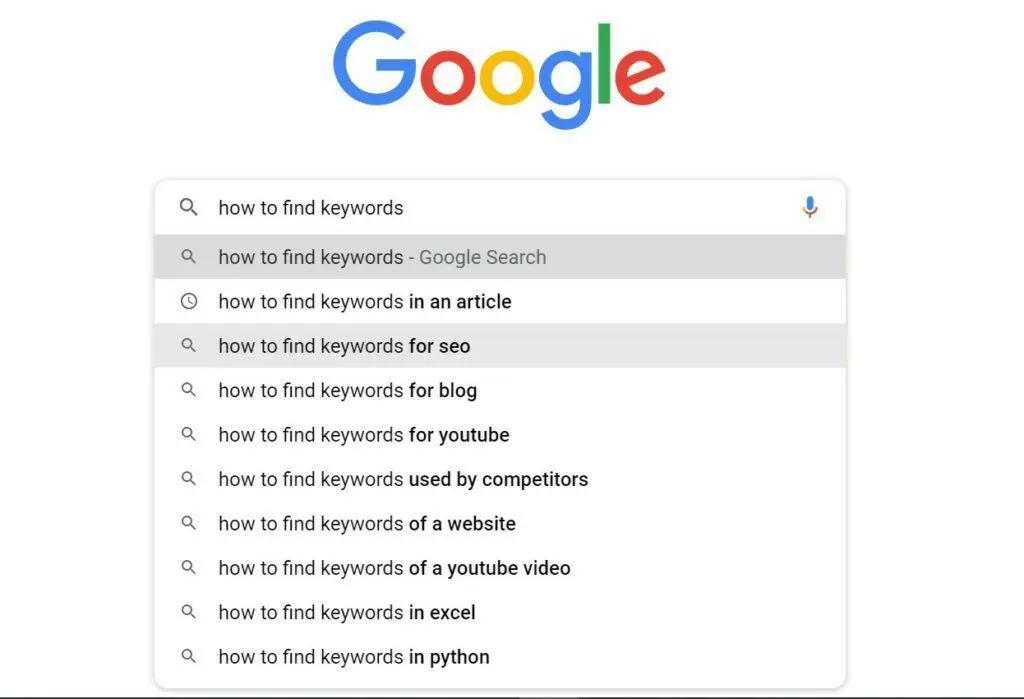
You can also use Google Autocomplete.
Start typing a phrase into Google and observe the suggestions that appear. These suggestions can reveal common ways people phrase searches.
For example, type:
“How to find…”
You may see suggestions related to keywords, blog topics, products, or other subjects.
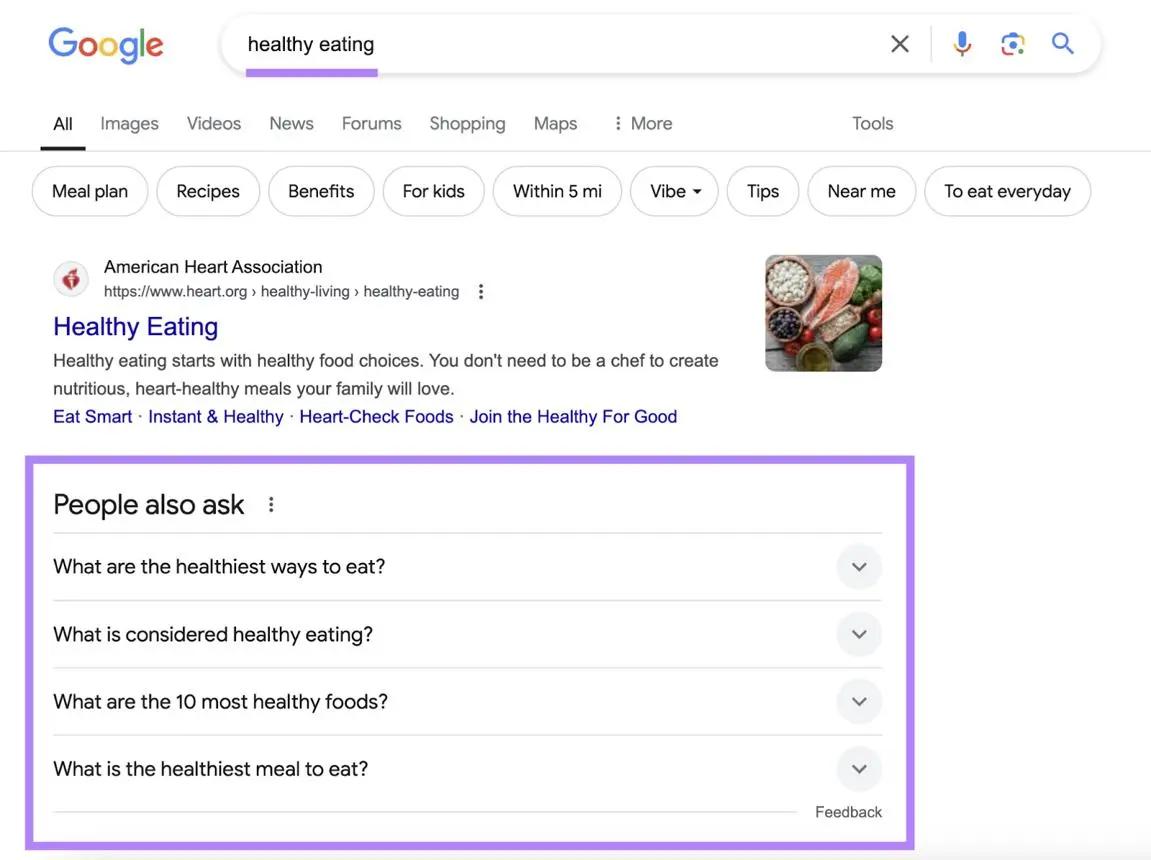
Google’s related searches can also reveal alternative phrases and closely connected topics.
The questions displayed in search results, where available, may provide additional ideas about what users want to understand.
Remember that these suggestions are sources of ideas, not proof of exact search volume or guaranteed ranking opportunities.
Step 4: Understand Search Intent
Finding a keyword is only part of the process. You also need to understand what the searcher expects to find.
Consider these searches:
| Search query | Likely search intent |
|---|---|
| What is keyword research? | Informational |
| How to do keyword research | Informational |
| Best keyword research tools | Commercial investigation |
| Ahrefs vs Semrush | Commercial investigation |
| Buy SEO software | Transactional |
Search intent influences the type of content you should create.
For example, if someone searches for “how to do keyword research,” they probably expect a tutorial with practical instructions.
A product sales page would not be the most suitable response to that query.
One useful way to understand search intent is to examine the current Google results for your target keyword.
Look at the pages appearing near the top:
- Are they beginner guides?
- Are they comparison articles?
- Are they product pages?
- Are they videos?
- Are they step-by-step tutorials?
- Do they answer a particular question?
The results can help you understand what type of content Google is presenting for that search.
You do not need to copy competing articles. Instead, identify the information users seem to need and consider how your article can answer their questions more clearly and completely.
Step 5: Analyse Search Demand
Search demand refers to the level of interest in a keyword.
Some tools provide estimated monthly search volumes, which can help you compare keyword ideas.
However, these figures are estimates. They can vary by tool, country, language, date range, and other settings.
A keyword with a large estimated search volume is not necessarily the best choice for your website.
For example, a broad phrase may attract many searches but have unclear intent or very strong competition. A more specific phrase may attract fewer searches while being more relevant to your audience.
When reviewing search demand, consider:
- Is the keyword relevant to your website?
- Does it represent a topic your audience cares about?
- Is there evidence that people are searching for it?
- Is the interest consistent or seasonal?
- Can your website provide a genuinely useful answer?
Do not reject a keyword simply because a tool reports a low or unavailable search volume. Some specific searches may be poorly represented in keyword databases.
Step 6: Evaluate Competition and Ranking Difficulty
Keyword competition is another important consideration.
Some SEO tools provide a keyword difficulty score. This is usually an estimate based on the tool’s own methodology and available data.
It is not an official Google ranking score, and it cannot tell you with certainty whether your article will rank.
For a more practical assessment, inspect the actual search results.
Look for:
- The authority and relevance of the competing websites
- The quality and depth of the ranking articles
- Whether the results directly answer the search query
- Whether the results are dominated by large established websites
- Whether there are useful questions or subtopics that competing pages overlook
- Whether your website can provide a better or more relevant answer
A new website may struggle to compete for a broad phrase dominated by established websites.
However, you should not assume that every specific phrase is easy to rank for. Some long-tail keywords also have strong competition.
Your objective is to identify a relevant topic where your website can offer something valuable.
Step 7: Choose a Primary Keyword and Supporting Keywords
After evaluating your ideas, select the main keyword you want an article to target.
This is your primary keyword.
You can then identify closely related terms and questions that naturally belong in the same article. These are often called secondary or supporting keywords.
For example:
Primary keyword: How to do keyword research
Supporting keywords:
- Keyword research for beginners
- How to find keywords for SEO
- Free keyword research tools
- Long-tail keywords
- Search intent
- How to choose keywords for a blog
You do not need to force every supporting phrase into your article.
Use them where they help explain the subject or answer a related question.
One article can naturally address several closely related searches. There is no need to create a separate page for every slight variation of the same phrase.
Step 8: Group Keywords into Content Topics
Keyword grouping means organising related search phrases into logical topics.
This helps you decide whether several phrases belong in one article or deserve separate pages.
For example:
| Keyword group | Possible article |
|---|---|
| How to start a blog, starting a blog for beginners | How to Start a Blog |
| Keyword research, finding keywords, keyword tools | Keyword Research for Beginners |
| Google Search Console, checking indexing, search performance | How to Use Google Search Console |
| WordPress vs Blogger, blogging platforms | Best Blogging Platforms Compared |
This approach helps you build a content plan around related subjects.
It also reduces the risk of publishing several articles that compete with one another for essentially the same search intent.
Best Free Keyword Research Tools for Beginners
You do not need to pay for expensive SEO software before you can begin researching keywords.
Several free tools can help you discover search ideas, understand interest, and analyse how your existing website performs.
1. Google Keyword Planner
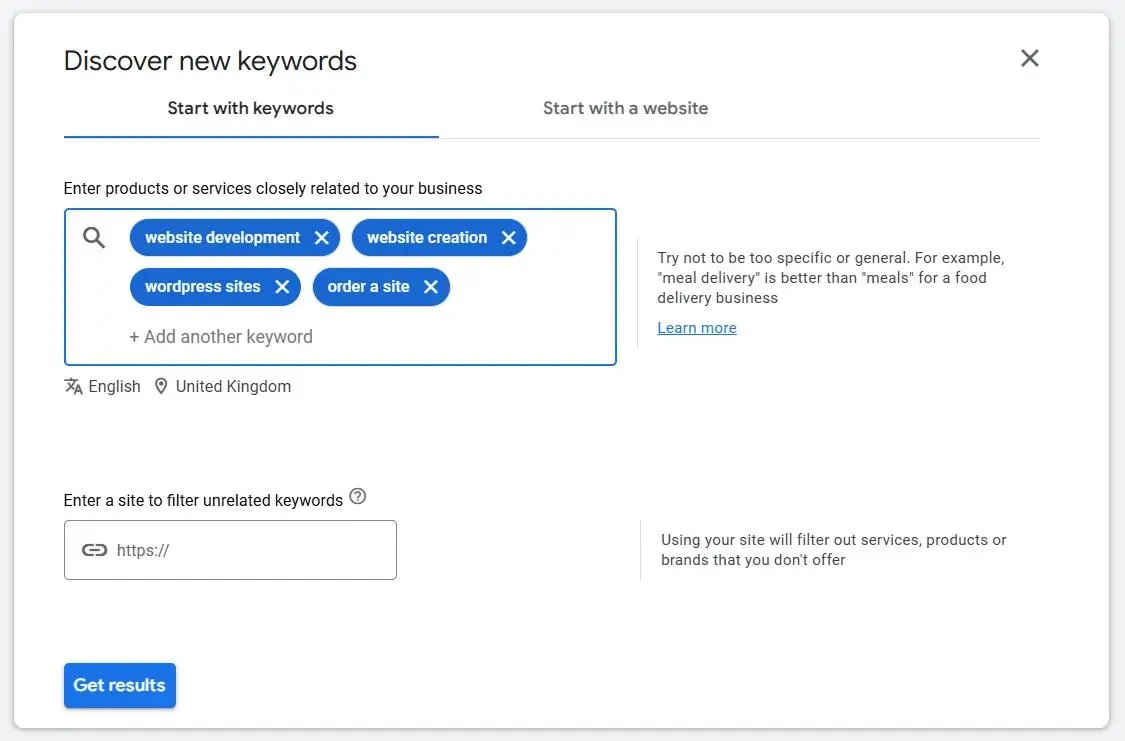
Google Keyword Planner is a keyword research tool available through Google Ads.
It helps users discover keyword ideas and examine estimated search demand.
You can enter a word, phrase, or website to generate related keyword suggestions.
How to use it:
- Visit Google Ads.
- Sign in to your account.
- Open Keyword Planner.
- Choose the option to discover new keywords.
- Enter a topic related to your website.
- Review the keyword suggestions.
- Examine available search-volume estimates and other information.
- Save relevant ideas for further research.
For example, entering “start a blog” may generate related phrases concerning blogging platforms, blog creation, and website setup.
Advantages:
- It is a Google tool.
- It provides keyword suggestions.
- It offers search-demand estimates.
- You can investigate different locations and languages.
Limitations:
- Access requires a Google Ads account.
- Search-volume information may be shown in ranges or with limited detail depending on account circumstances.
- Its competition metric relates to advertising competition, not organic SEO difficulty.
You should not interpret a high Google Ads competition rating as proof that a keyword is difficult to rank for in organic search.
Visit: https://ads.google.com/home/tools/keyword-planner/
2. Google Trends
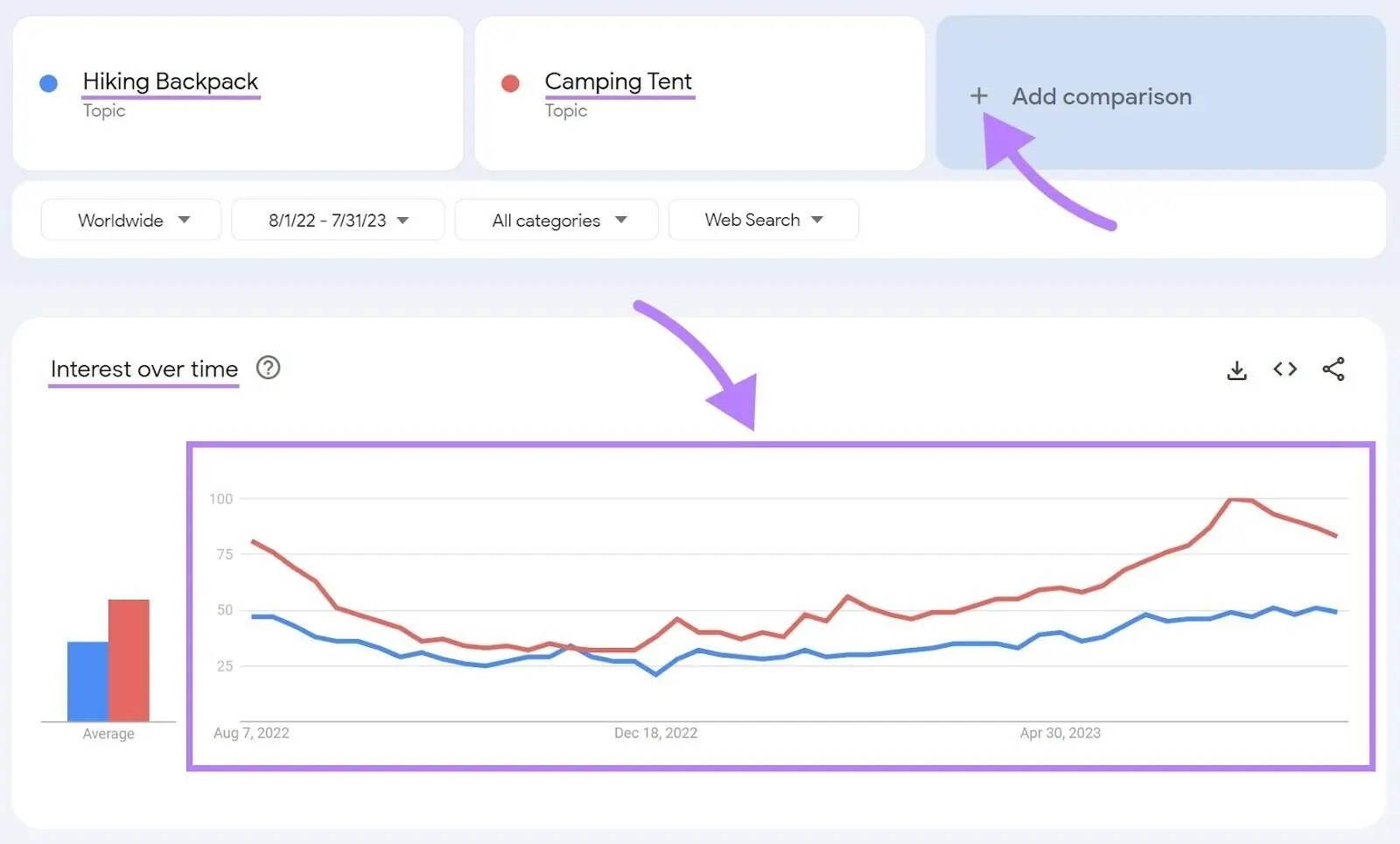
Google Trends helps you explore how interest in a search term changes over time.
It is particularly useful when you want to compare topics, investigate seasonal interest, or understand how search behaviour differs between locations.
How to use it:
- Visit Google Trends.
- Enter a keyword or topic.
- Select the location you want to investigate.
- Choose a suitable date range.
- Compare related search terms.
- Examine interest over time and related topics or queries where available.
For example, a Nigerian blogger researching online business topics could compare interest in “start a blog” and “start an online business” in Nigeria.
This can help identify differences in relative interest.
Advantages:
- Free to use.
- Useful for comparing topics.
- Helps identify seasonal patterns.
- Supports geographic comparisons.
Limitations:
- Its interest score is relative, not an exact monthly search count.
- Low-volume searches may have insufficient data.
- A rising trend does not guarantee that a topic will attract substantial traffic to your website.
Visit: https://trends.google.com/
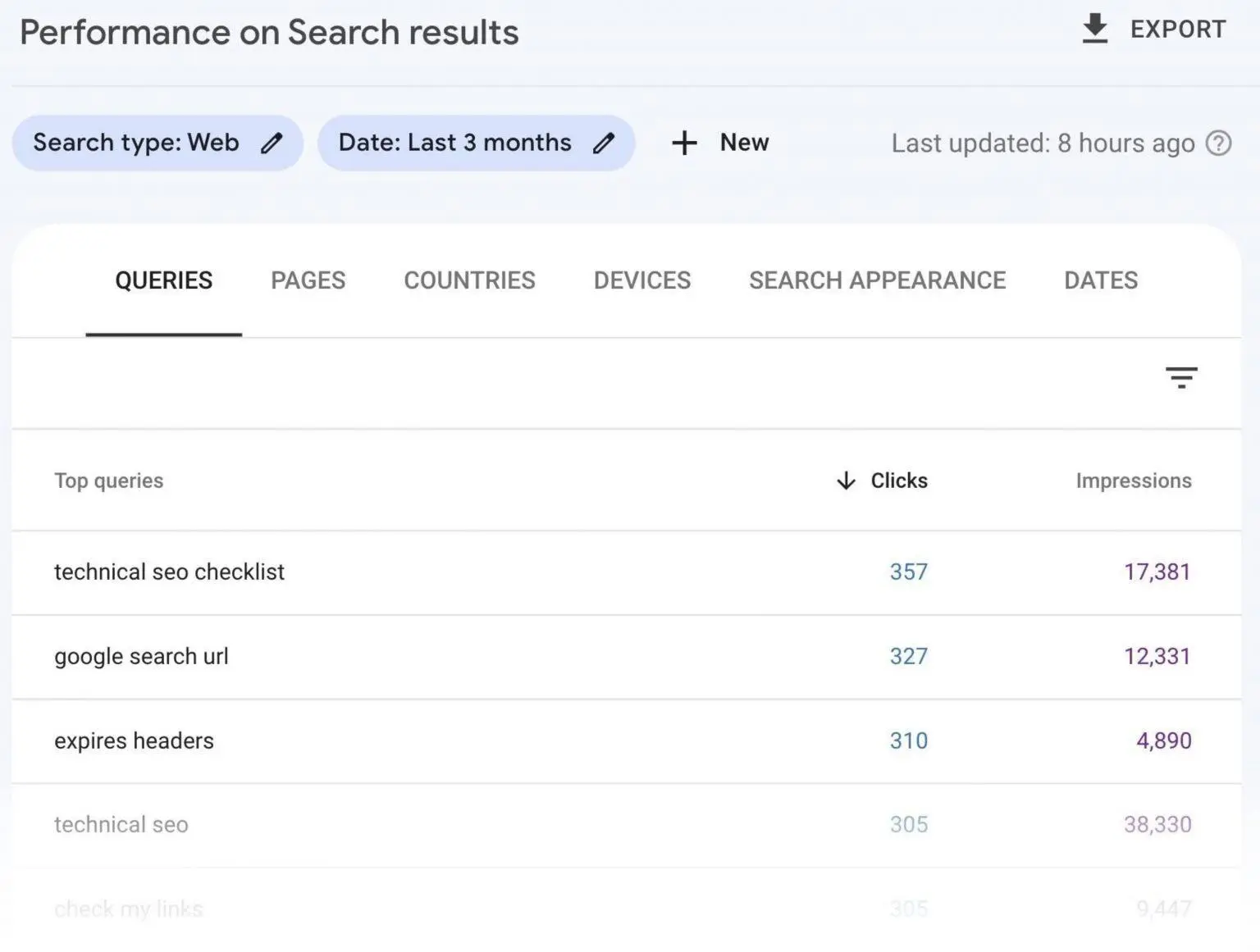
3. Google Search Console
Google Search Console is especially useful once your website has started appearing in Google Search results.
Unlike a keyword discovery tool that provides general estimates, Search Console shows how people actually find your website through Google Search.
You can use it to examine:
- Search queries that generate impressions
- Clicks received from search results
- Impressions
- Click-through rate (CTR)
- Average search position
- The pages receiving search traffic
How to use it for keyword research:
- Open Google Search Console.
- Select your website property.
- Go to the Performance report.
- Select the Search results report.
- Open the Queries tab.
- Review the search terms generating impressions.
- Identify relevant queries that may deserve better coverage.
- Check which pages are receiving clicks for those queries.
Suppose one of your articles receives impressions for a question you did not deliberately target.
That query may reveal an opportunity to improve the article or create a related resource, depending on its search intent.
You can also compare performance over time to see whether your content is gaining or losing visibility.
Advantages:
- Shows actual search performance for your property.
- Helps identify unexpected keyword opportunities.
- Connects search queries with individual pages.
- Useful for ongoing content improvements.
Limitations:
- It requires website ownership verification.
- It only provides information available for your verified property.
- It does not show every search made by every user.
- It is not a replacement for researching keywords before publishing your first articles.
For a more detailed explanation, read our guide: How to Use Google Search Console to Improve Your Website.
Visit: https://search.google.com/search-console/about
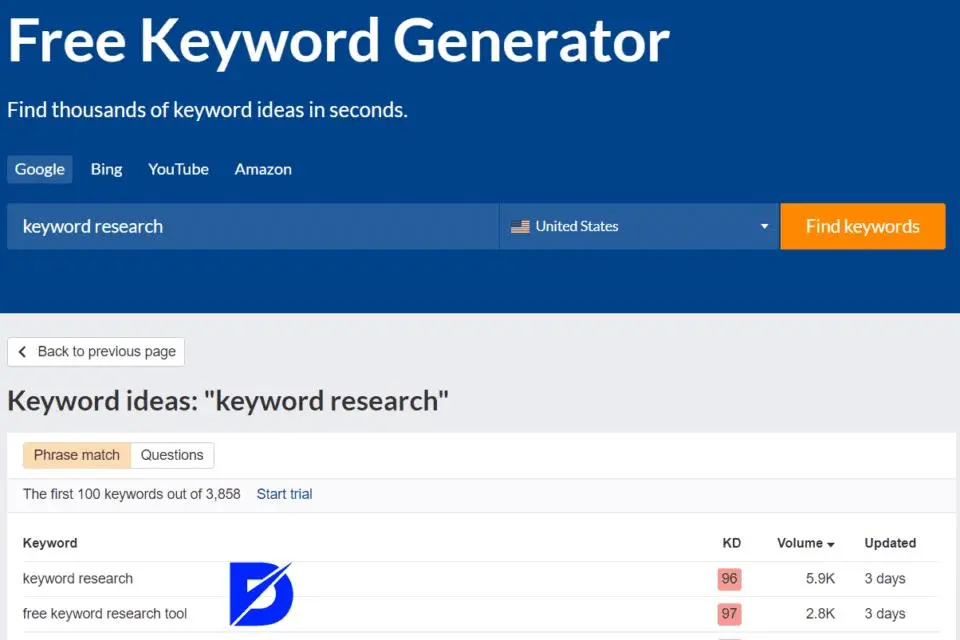
4. Ahrefs Free Keyword Generator
Ahrefs provides a free keyword research tool that can help you discover keyword ideas related to a topic.
Enter a seed keyword, choose a search engine and location where supported, and review the suggestions.
It can be useful when expanding a basic keyword list or exploring related search phrases.
Advantages:
- Provides related keyword ideas.
- Useful for discovering specific search phrases.
- Can provide additional keyword metrics.
Limitations:
- Free access is limited compared with paid Ahrefs products.
- Available data and features may vary.
- Tool estimates should be treated as research indicators rather than guarantees.
Visit: https://ahrefs.com/keyword-generator
5. Semrush
Semrush is an SEO and digital marketing platform with keyword research and competitor analysis features.
Its keyword research tools can help you explore search volume estimates, keyword difficulty, related phrases, and other SEO information.
It is useful for website owners who want to move beyond basic keyword discovery.
Advantages:
- Offers detailed keyword research features.
- Supports competitor analysis.
- Provides keyword suggestions and related data.
- Useful for more advanced SEO planning.
Limitations:
- Many advanced features require a paid subscription.
- Free access is restricted.
- Its keyword metrics are estimates, not direct measurements of Google’s ranking decisions.
You do not need a paid Semrush subscription to begin learning keyword research.
Visit: https://www.semrush.com/
6. Google Autocomplete and Related Searches
Sometimes, one of the simplest ways to discover keyword ideas is to use Google Search itself.
Google Autocomplete displays suggested searches as you type. Related searches can provide additional phrases connected to the topic.
For example, typing “how to start a blog” may reveal suggestions related to blogging costs, platforms, and beginner tutorials.
These suggestions can help you discover the language people use when searching.
How to use this method:
- Open Google Search.
- Enter a broad topic.
- Observe the autocomplete suggestions.
- Search for the topic.
- Review related searches near the results.
- Record relevant phrases.
- Investigate the search intent behind each phrase.
Advantages:
- Free and easy to access.
- Helps generate content ideas.
- Useful for finding specific questions and related searches.
Limitations:
- Suggestions are not a complete keyword database.
- They do not provide reliable exact search-volume figures.
- Suggestions can vary by location, language, and search context.
How to Find Low-Competition Keywords
Many beginner bloggers want to find low-competition keywords because competing against established websites can be difficult.
The idea is sensible, but it is important to understand what low competition actually means.
A keyword with a low difficulty score in one SEO tool is not automatically easy to rank for. Different tools use different methods to estimate difficulty.
A better approach is to combine keyword research with an examination of the actual search results.
Here are some practical techniques.
1. Look for Specific Search Phrases
Start with broad keywords and expand them into more specific questions.
For example:
- Broad: WordPress
- More specific: WordPress for beginners
- More focused: How to create a WordPress website for a small business
The more specific phrase may communicate a clearer search intent.
Check whether people are searching for it and whether your website can provide a useful answer.
2. Research Questions Your Audience Asks
Questions often reveal specific problems that deserve individual articles or sections.
Examples include:
- How do I choose a domain name?
- How do I install WordPress?
- How do I submit a sitemap?
- How do I write a blog post that ranks on Google?
You can discover these questions through Google suggestions, related searches, online discussions, and your own audience feedback.
3. Examine the Existing Search Results
Search for your target phrase and inspect the pages that appear.
Ask yourself:
- Are the top results directly answering the question?
- Are they outdated?
- Are they too advanced for beginners?
- Do they leave important questions unanswered?
- Could you provide a clearer explanation or a more useful example?
Finding a gap does not mean deliberately publishing a longer article than every competitor. It means identifying what readers need and delivering it effectively.
4. Consider Geographic Relevance
Location can influence keyword selection.
For example, a website targeting Nigerian readers may investigate phrases such as:
- Best web hosting for Nigerian bloggers
- How to start an online business in Nigeria
- Affordable domain registration in Nigeria
These phrases may be more relevant than a broad international keyword if your audience is primarily in Nigeria.
However, do not add “Nigeria” to every keyword automatically. Use location terms when they genuinely match the audience’s needs and the search results support that approach.
5. Explore Your Existing Search Console Data
If your website already receives impressions, check Search Console for queries where your pages appear but may not be attracting many clicks.
These queries can reveal opportunities to:
- Improve the article title.
- Make the content more relevant to the search.
- Add a missing explanation.
- Improve the page’s introduction.
- Create a separate article if the query represents a distinct topic.
Always consider the search intent before making changes.
 Worked Example: Researching Keywords for a Blog Post
 Worked Example: Researching Keywords for a Blog Post
Let’s put the process together.
Imagine you run a website about blogging, WordPress, SEO, and online business. You want to publish an article that helps beginners understand how to start a blog.
Rather than choosing a title immediately, you begin with keyword research.
Stage 1: Choose Your Seed Keyword
Your starting phrase is:
Blogging
This is broad, so you expand it into more specific ideas.
Stage 2: Generate Keyword Ideas
After brainstorming and using keyword discovery methods, you create a list like this:
| Keyword idea | Possible reader need |
|---|---|
| How to start a blog | Wants a complete beginner guide |
| How to create a blog for beginners | Needs step-by-step instructions |
| Best blogging platform | Wants to compare platforms |
| How much does it cost to start a blog? | Wants to understand expenses |
| How to make money blogging | Wants to monetise a blog |
| WordPress vs Blogger | Wants to compare two platforms |
These are illustrative research ideas, not verified search-volume figures.
Stage 3: Identify Search Intent
Now classify the phrases according to what the searcher wants.
| Keyword | Likely intent |
|---|---|
| How to start a blog | Informational |
| Best blogging platform | Commercial investigation |
| How much does it cost to start a blog? | Informational / commercial investigation |
| How to make money blogging | Informational |
| WordPress vs Blogger | Commercial investigation |
This reveals that the phrases are related, but they do not all necessarily belong in one article.
Stage 4: Inspect the Search Results
Search for “how to start a blog” and review the pages ranking for the phrase.
You might find beginner tutorials explaining domain registration, hosting, platform selection, website setup, and publishing.
That suggests readers expect a practical guide rather than a short definition.
You can then ask whether your article will provide all the essential steps, explain costs clearly, and help readers avoid common mistakes.
Stage 5: Select the Target Keyword
For the beginner guide, you might choose:
Primary keyword: How to start a blog
Supporting keywords:
- How to create a blog for beginners
- Starting a blog
- Best blogging platform for beginners
- Cost of starting a blog
- How to set up a blog
You can then address closely related questions naturally within the article.
Stage 6: Plan Separate Articles for Related Topics
Some keyword ideas deserve their own pages because they have distinct search intent.
For example:
- A comparison article about WordPress and Blogger.
- A guide explaining the cost of starting a blog.
- A tutorial about making money from blogging.
These articles can link to the main beginner guide and to one another where useful.
This creates a connected collection of content instead of several unrelated posts.
The lesson: Keyword research is not about collecting as many phrases as possible. It is about understanding your audience, identifying useful topics, and organising those topics into content that answers real questions.
How to Use Keywords in Your Blog Posts
After selecting your keywords, the next step is to use them naturally in your content.
Search engines need to understand what a page is about, but readers should always come first.
Here are some useful places to include your primary keyword where appropriate.
1. SEO Title
Your SEO title helps communicate the subject of your page.
For example:
“Keyword Research for Beginners: How to Find the Right Keywords”
This title clearly describes the article and includes the main topic.
Avoid repeating the same phrase unnecessarily just to make the title appear more optimised.
2. Main Heading (H1)
Your H1 heading should clearly communicate the article’s subject.
It can be similar to the SEO title, although they do not have to be identical.
Use one clear main heading for the article.
3. Introduction
Introduce the topic naturally near the beginning of the article.
For example:
“Keyword research is an important part of SEO because it helps you understand what your audience searches for and which topics deserve attention.”
This communicates the subject without awkward repetition.
4. Subheadings
Use relevant secondary phrases in subheadings when they accurately describe the section.
For example:
- Best Free Keyword Research Tools
- How to Find Low-Competition Keywords
- Understanding Search Intent
Do not create subheadings solely to insert keywords. They should help readers navigate the article.
5. URL Slug
Keep your URL short, descriptive, and easy to understand.
For example:
example.com/keyword-research-for-beginners/
Avoid unnecessarily long URLs filled with repeated keywords.
6. Image Alt Text
Write descriptive alt text for images that communicate useful information.
For example:
“Example of a keyword research spreadsheet showing search phrases and search intent.”
Alt text should describe the image, not serve as a place to stuff keywords.
Decorative images may not need descriptive alt text.
7. Internal Links
Link to other relevant pages on your website when they provide additional value.
For example, an article about keyword research could link to your guides on:
- Starting a blog
- Using Google Search Console
- Improving website SEO
- Writing blog posts
Use descriptive anchor text that helps readers understand what they will find when they follow the link.
8. Meta Description
A meta description summarises a page’s content and may be used by Google as the search-result snippet.
Include the main subject naturally and explain what readers will learn.
However, Google may generate a different snippet based on the search query. Writing a meta description does not guarantee that Google will display it exactly as submitted.
Common Keyword Research Mistakes to Avoid
Even when you use good tools, certain mistakes can weaken your keyword strategy.
1. Choosing Keywords Only Because They Have High Search Volume
A popular keyword may look attractive, but it may not be relevant to your website.
It may also be extremely competitive or have search intent that does not match your content.
Relevance and usefulness should come before impressive-looking volume figures.
2. Ignoring Search Intent
An article may contain the right words but still fail to satisfy what searchers want.
For example, someone searching for “best web hosting for beginners” probably expects comparisons and recommendations.
A general article explaining what web hosting means may not fully meet that need.
Always examine the search results before deciding what to publish.
3. Targeting Too Many Keywords in One Article
Trying to target unrelated keywords in a single post can make the content unfocused.
Choose one main topic and include supporting phrases that naturally belong to it.
Create separate articles when the search intent or subject is substantially different.
4. Keyword Stuffing
Keyword stuffing happens when a phrase is repeated excessively or inserted unnaturally to influence search rankings.
For example:
“Keyword research for beginners is important because keyword research for beginners helps beginners understand keyword research for beginners.”
This is unpleasant to read and does not improve the usefulness of the content.
Write naturally and explain the subject properly.
5. Ignoring Long-Tail Keywords
Broad keywords are not the only opportunities available.
Specific phrases can reveal detailed questions that your audience needs answered.
Research both broad topics and more focused search queries.
6. Treating SEO Tool Metrics as Guarantees
Search volume, keyword difficulty, and traffic estimates are useful research indicators.
They are not promises of actual traffic or search rankings.
Use them alongside your own assessment of search intent, competing pages, relevance, and content quality.
7. Forgetting to Update Your Keyword Research
Search behaviour changes over time.
New questions emerge, products change, and topics can become more or less relevant.
Review your existing content periodically and use available Search Console data to identify opportunities for improvement.
Frequently Asked Questions About Keyword Research
1. What is the best free keyword research tool?
There is no single best tool for every situation.
Google Keyword Planner is useful for discovering keyword ideas and estimated search demand. Google Trends helps compare interest over time. Google Search Console is especially valuable for understanding the queries that already bring people to your website.
Beginners can combine these tools without immediately paying for an SEO subscription.
2. How many keywords should I target per blog post?
Start with one primary keyword or central topic.
You can also address several closely related supporting keywords and questions within the same article.
There is no fixed number that guarantees good SEO performance. The important thing is that the article remains focused and satisfies the reader’s search intent.
3. Are long-tail keywords better for beginners?
Long-tail keywords can be useful because they often describe a more specific need.
They may also offer more focused content opportunities than broad terms.
However, long-tail keywords are not automatically easy to rank for. Evaluate relevance, search intent, search results, and competition before choosing them.
4. Can I do keyword research without paying for tools?
Yes.
You can begin with Google Autocomplete, related searches, Google Trends, Google Keyword Planner, and your own Search Console data.
These resources can help you discover keyword ideas and understand search behaviour.
Paid SEO tools offer additional features, but they are not a requirement for learning the fundamentals.
5. What is keyword difficulty?
Keyword difficulty is an estimate used by SEO tools to describe how challenging it may be to rank for a particular search term.
Different tools calculate it differently.
It is not an official Google score and should not be treated as a guarantee of ranking success.
Always examine the actual search results and assess whether your website can provide a competitive, useful answer.
6. What is the difference between a keyword and a search query?
A keyword is a term or phrase that website owners and SEO professionals research and target in their content strategy.
A search query is the actual word or phrase entered by a user into a search engine.
The terms are often used interchangeably, but the distinction is useful when analysing how people find your website.
7. Should I use the same keyword on multiple pages?
You can naturally mention the same subject across several pages, but avoid creating multiple pages that target essentially the same search intent without a clear reason.
For example, two nearly identical beginner guides targeting “how to start a blog” may compete with each other.
Instead, create separate pages for genuinely different topics, such as starting a blog, comparing blogging platforms, and understanding blogging costs.
8. How often should I do keyword research?
You should research keywords whenever you plan new content.
It is also useful to revisit your content strategy periodically, especially when your audience, website focus, or industry changes.
For existing articles, Search Console can help reveal new queries and opportunities for improvement.
Final Thoughts
Keyword research is one of the foundations of an effective SEO strategy.
It helps you understand your audience, discover useful topics, match content to search intent, and make more informed decisions about what to publish.
You do not need to master every SEO tool before getting started. Begin with a topic that matters to your audience, generate related search phrases, examine the search results, and select keywords that your website can address with useful content.
Most importantly, remember that finding a keyword is only the beginning. Your article still needs to answer the reader’s question clearly, accurately, and completely.
Start with one topic, conduct your research, publish a helpful article, and use the information available in Google Search Console to understand how people discover it.
With consistent research and useful content, you can build a website that serves its audience while developing a stronger foundation for organic search visibility.
Helpful Resources
The following official and tool resources can help you continue learning:
- Google Search Central – Official documentation about Google Search and SEO.
- Google Keyword Planner – Discover keyword ideas and estimated search demand.
- Google Trends – Compare search interest and explore trends.
- Google Search Console – Monitor your website’s performance in Google Search.
- Ahrefs Free Keyword Generator – Explore related keyword ideas.
- Semrush – Explore SEO and keyword research features.
Editorial note: Keyword metrics and tool features can change. Always check the current tool interface and settings before relying on a particular figure or feature.












Leave a Comment
Your email address will not be published. Required fields are marked with *